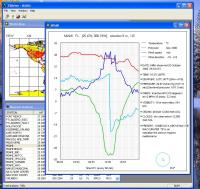
- Real-time weather data from 7000 stations all around the world.
- Diagramms for weather data.
- History of weather data for the past 1 - 60 hours.
- USA or European style.
- Frendly user interface.
- More then 7000 weather stations works day and night all around the World.
- Now you can get a real-time meteo data from all of them.
- You can get also a history of meteo data for the past 1 - 60 hours.
- Care about your family, make a business trip, land a plane, sail anywhere safely!
How to use it:
- double click on a worldmap for a list of a nearest stations;
- double click (or press Enter) in a list at a station you are interesting for;
- you will get a past 6 hours of meteodata for that station;
- then you will getting the new meteodata every 10 - 60 minutes (depending of station) automatically;
- use "Mark all stations" button for show all stations on the world map as a red points;
- use "Show all stations table" button for show a list of all stations;
- use "Find station" button for finding a station by a part of the name or by the ICAO code;
Parameters dialog:
- select a meteo data to show on a diagramm: temperature, pressure, wind speed, wind direction;
- set a USA style (Fahrenheit etc) or European style (Celsius etc);
- change the past time to show in a range of 1 to 60 hours;
- change the distance for looking around the double-clicked point on a world map (in minutes, 1 minute = 1 naut. mile);
- set write or not a meteodata for the current station to a txt file;
Tips:
- the changes you have made in a meteo part of Parameters dialog will be shown for the next opened station;
- in a list of stations use keys: "Home" for go to top, "End" for go to bottom, "Page Up", "Page Down" for scrolling, "Enter" for select a station;
- quickly select one of the last stations in menu "File";
- click a header of column in a stations list for sortinig a list by that column; Whats new in version 1.2: No changes Requirements: Internet connection Operating system: Win98,WinME,Windows2000,WinXP,Windows2003,Windows Vista Home Basic Release notes: Major Update
Sheet metal for AutoCAD. It calculates flat (unfolded) sheet development of ducts, rectangle to round transitions, cylinders, cones, intersections, connections, bifurcations, elbows, etc. For HVAC, hoppers, cyclones, ducts, silos, piping, etc.
Price: $78, Rating: 10, Downloads: 117 Download
HighRoad is an interactive graphical application for the geometric design of roads and highways. Its intelligent object design and highly intuitive interface allows for fast and flexible design
Price: $150, Rating: 6, Downloads: 95 Download
DataFit is a tool for performing curve fitting, statistical analysis & data plotting. Fit equations with up to 100 parameters to data with up to 20 independent variables. Define your own equations or choose from over 600 pre-defined equations.
Price: $249.00, Rating: 8.5, Downloads: 68 Download
Set Me Up is a great tool for customizing your desktop to your own preference or to company image requirement. Set Me Up will help you to quickly and easily improve your computer's performance.
Price: $9.99, Rating: 2.5, Downloads: 60 Download
Calculation of the optimum cross-section of slender struts strained for buckling and strength check calculation
according to Johnson, Tetmajer, Euler and Secant method. Simple definition of the strut type - 40 types of
predefined cross sections.
Price: $21, Rating: 10, Downloads: 55 Download
User Rating
Rating:2.2 out of
5 Based on13 ratings.
13 user reviews.

 VIMeteo 1.2 details